

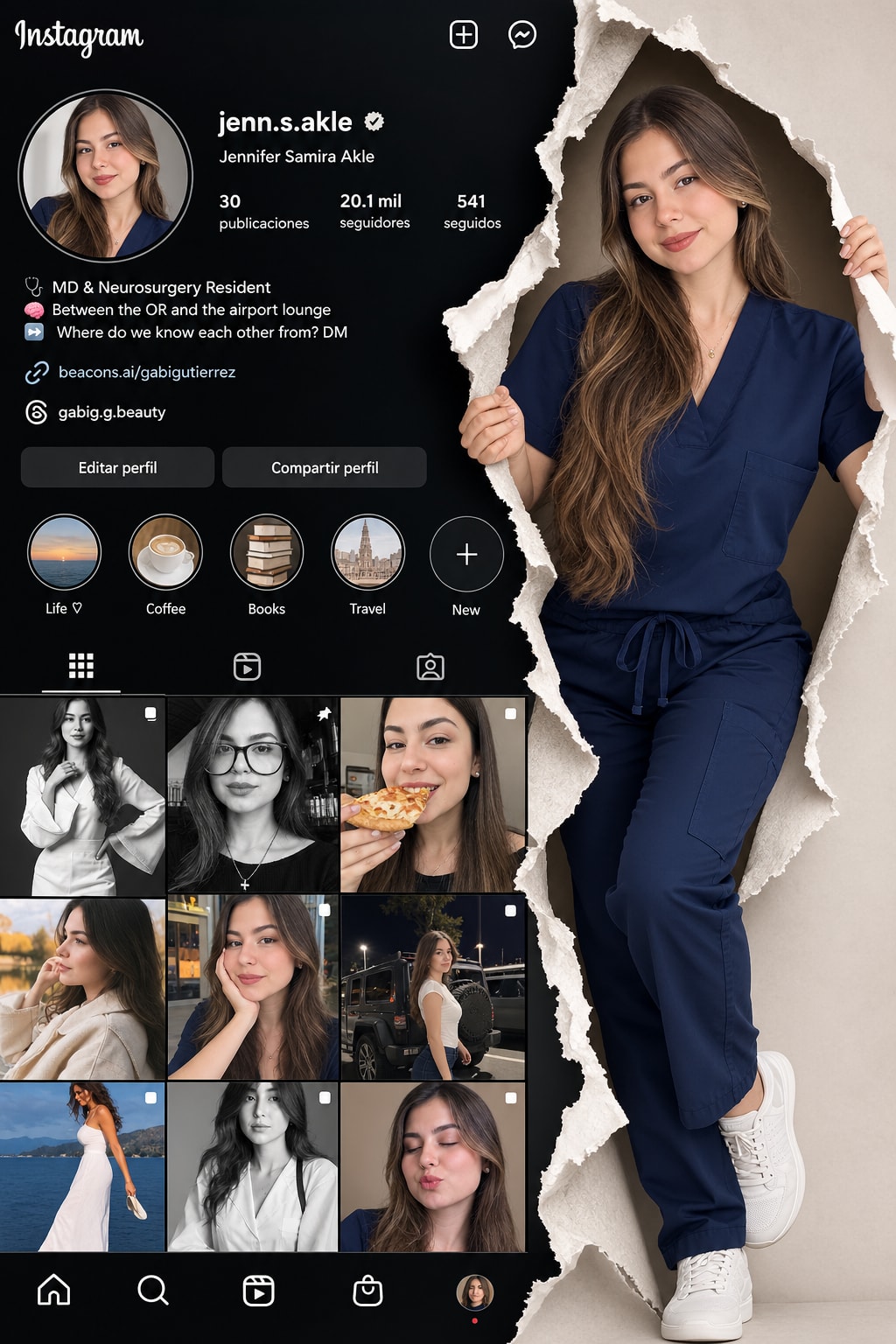
인스타 찢어진 종이 연출
SNS 프로필과 인물이 찢어진 종이 틈으로 입체감 있게 드러나는 모던한 홍보 이미지를 제작할 때 사용합니다.
- 추천 툴
- MidjourneyAI 분류
- 쓰인 기법
- 상세 묘사 · 구성 지정
프롬프트 원문
Recreate this composition maintaining exactly the same style and visual structure, but replacing the specified elements:
General Composition:
Divide the image into two sections with a vertical torn paper effect in the center.
Left side: Instagram profile interface with a circular profile picture at the top, username, stats (posts, followers, following), bio, links, action buttons, circular story highlights, and a post grid.
Right side: Full-body figure of a standing person.
Torn Paper Effect:
Create an irregular torn paper edge separating both sections.
The paper must have a realistic texture with shadows and depth.
The person on the right side should appear 'emerging' through the tear.
Elements to Replace:
Background/UI Image (left side): Use the provided background image to recreate the Instagram interface, maintaining the same layout, typography, and structure.
Person (right side): Use the provided face/model image to recreate the full-body figure, maintaining the pose of holding a cell phone and the standing position.
Visual Style:
Maintain a professional and modern aesthetic.
Coherent colors between both sections.
Natural and realistic lighting.
Correct proportions and perspective.
한국어 풀이 보기(참고용)
동일한 스타일과 시각적 구조를 유지하면서 지정된 요소를 교체하여 이 구도를 재현하세요:
전체 구도:
중앙의 수직 찢어진 종이 효과로 이미지를 두 섹션으로 나누세요.
왼쪽: 상단의 동그란 프로필 사진, 사용자 이름, 통계(게시물, 팔로워, 팔로잉), 소개글, 링크, 작업 버튼, 동그란 스토리 하이라이트, 게시물 그리드가 있는 인스타그램 프로필 인터페이스.
오른쪽: 서 있는 사람의 전신 모습.
찢어진 종이 효과:
두 섹션을 나누는 불규칙한 찢어진 종이 가장자리를 생성하세요.
종이는 그림자와 깊이감이 있는 사실적인 질감을 가져야 합니다.
오른쪽의 인물은 찢어진 틈으로 '튀어나오는' 것처럼 보여야 합니다.
교체할 요소:
배경/UI 이미지(왼쪽): 제공된 배경 이미지를 사용하여 동일한 레이아웃, 타이포그래피, 구조를 유지하면서 인스타그램 인터페이스를 재현하세요.
인물(오른쪽): 제공된 얼굴/모델 이미지를 사용하여 스마트폰을 들고 서 있는 자세를 유지한 전신을 재현하세요.
시각적 스타일:
전문적이고 현대적인 미학을 유지하세요.
두 섹션 간의 일관된 색감.
자연스럽고 사실적인 조명.
정확한 비율과 원근법.
- 활용원하는 브랜드 색상이 있다면 Visual Style 부분에 구체적인 세공 칼라를 추가하세요.
- 활용인물 사진 이미지 참조 URL과 함께 입력하면 페이스 스왑 효과가 극대화됩니다.
출처 · prompts.chat · Instagram UI Torn Paper Reveal — 원문은 출처에 게시된 그대로이며, 권리는 원작자에게 있습니다.
원작 결과 이미지
원문 작성자(Alejandro García Garay)가 prompts.chat 에 올린 결과입니다. 원본 주소에서 표시됩니다.
mopick 개선안
원문을 더 잘 동작하게 고쳐 쓴 프롬프트
원문을 그대로 넣으면 AI 가 매번 다르게 답하거나 중요한 부분을 빠뜨릴 수 있습니다. 개선안은 원문의 뜻과 언어는 그대로 두고 역할 · 바꿔 넣을 입력 칸 · 결과 형식 · 지킬 조건을 보완해 다시 쓴 버전입니다. 원문과 같은 곳(ChatGPT · Claude 등)에 그대로 붙여 넣어 쓰면 됩니다.
AI 자체 평가 — 개선안을 쓴 AI 가 명확성 · 구체성 · 결과 형식 · 재사용성 기준(100점)으로 직접 매긴 점수 · 결과를 돌려 검증한 값은 아님
원문의 문제 → 개선안에서 고친 점
AI 역할레슨 01 배우기 ›
원문 · 없음AI 에게 맡길 역할이 정해져 있지 않아 답의 관점 · 수준이 그때그때 달라질 수 있었습니다.
개선 · 역할을 정함Act as an expert AI image designer. Recreate the provided reference composition maintainin
입력 칸레슨 05 배우기 ›
원문 · 없음바꿔 넣을 자리가 표시돼 있지 않아 쓸 때마다 원문을 직접 고쳐야 했습니다.
개선 · 3개[Insert Instagram UI Image/Reference] · [Insert Person/Model Image] · [e.g., 9:16 / 4:5]
작업 순서레슨 07 배우기 ›
원문 · 없음작업 순서가 정해져 있지 않아 AI 가 순서를 스스로 정해야 했습니다.
개선 · 4단계
고친 이유 (개선안을 만든 AI 의 설명)
- 1역할 정의 및 참조 이미지 입력란을 대괄호 변수로 명확히 매핑함
- 2종이 찢어짐 시각 효과와 인물 오버랩 연출 지침을 구체화함
- 3화면 비율 및 렌더링 품질 등 기술적 제어 파라미터를 추가함
이 개선안에 쓰인 기법 — 프롬프트 클래스에서 배우기
원문
Recreate this composition maintaining exactly the same style and visual structure, but replacing the specified elements:
General Composition:
Divide the image into two sections with a vertical torn paper effect in the center.
Left side: Instagram profile interface with a circular profile picture at the top, username, stats (posts, followers, following), bio, links, action buttons, circular story highlights, and a post grid.
Right side: Full-body figure of a standing person.
Torn Paper Effect:
Create an irregular torn paper edge separating both sections.
The paper must have a realistic texture with shadows and depth.
The person on the right side should appear 'emerging' through the tear.
Elements to Replace:
Background/UI Image (left side): Use the provided background image to recreate the Instagram interface, maintaining the same layout, typography, and structure.
Person (right side): Use the provided face/model image to recreate the full-body figure, maintaining the pose of holding a cell phone and the standing position.
Visual Style:
Maintain a professional and modern aesthetic.
Coherent colors between both sections.
Natural and realistic lighting.
Correct proportions and perspective.
개선안 · 색칠한 [칸]에 내 내용을 넣어 쓰세요
[Role & Task]
Act as an expert AI image designer. Recreate the provided reference composition maintaining the exact style and visual layout, but replacing specific elements using the inputs below.

[Inputs]
- Left UI Reference: [Insert Instagram UI Image/Reference]
- Right Model Reference: [Insert Person/Model Image]
- Target Aspect Ratio: [e.g., 9:16 / 4:5]

[Composition Rules]
1. Split-Screen Layout: Divide the frame into two sections with a vertical torn paper effect down the center.
2. Left Side (UI): Recreate the Instagram profile interface using [Insert Instagram UI Image/Reference] (profile photo, username, stats, bio, action buttons, highlights, post grid).
3. Right Side (Subject): Full-body standing figure using [Insert Person/Model Image], maintaining the pose of holding a smartphone.
4. Torn Paper Seam: Realistic torn paper texture with depth and shadows. The right figure must visually overlap and emerge slightly through the tear into the left section.

[Visual & Technical Parameters]
- Aesthetic: Professional, modern, seamless compositing.
- Lighting & Color: Coherent global lighting, matched color grading between both halves, realistic perspective.
- Output Quality: High detail, sharp focus, clean UI render.
같은 분야 프롬프트 이미지 · 영상
더 보기 ›- 원작 결과영상
이미지 · 영상 · Seedance 2.5
25초 연속 SF VFX 씬 연출
25초간 끊김 없이 4개 세계관을 포탈로 넘나드는 고품질 헐리우드 액션 VFX 숏을 연출할 때 사용합니다.
기법 · 타임라인별 지시 · 시각 연출 상세화 · 카메라 앵글 지정
- 원작 결과영상
이미지 · 영상 · 공통
숏폼 애니-실사 전환 영상
애니메이션 오프닝에서 실사 영상으로 자연스럽게 전환되는 몰입감 넘치는 숏폼 바이럴 영상을 연출할 때 활용합니다.
기법 · 역할 부여 · 상세 장면 지시 · 스타일 및 음향 지정
이미지 · 영상 · 공통
4구간 시네마틱 씬 연출
32초 분량의 영상을 8초씩 4개 구간으로 나누어 긴장감 넘치는 시네마틱 액션 장면을 기획합니다.
기법 · 역할 부여 · 시간대별 세분화 · 묘사 지시