

AI 캐릭터 피부·결 정교화
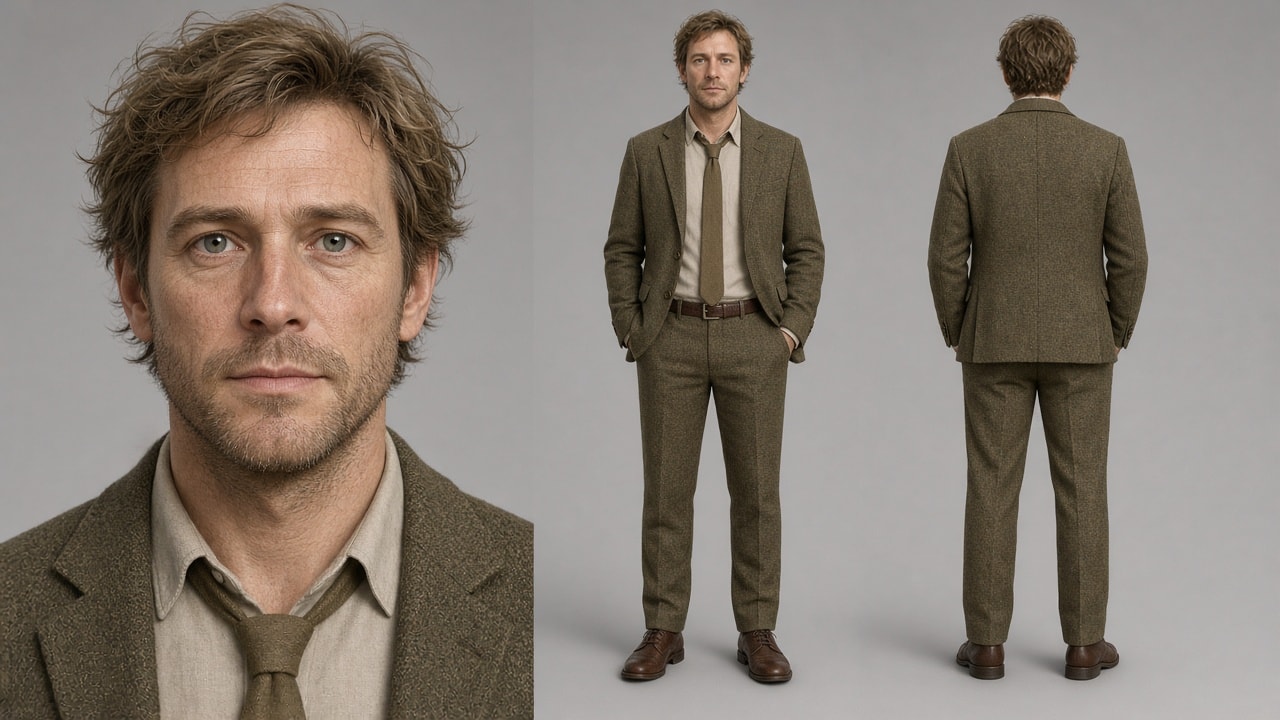
인물 캐릭터 시트의 부자연스러운 피부와 머리카락 텍스처를 자연스럽게 개선합니다.
- 추천 툴
- 이미지 생성AI 분류
- 쓰인 기법
- 입력 이미지 참조 및 텍스처 교체
프롬프트 원문
Inputs:
- Image 1: your character sheet (the image to fix)
- Image 2: a close-up skin texture reference
- Image 3: a hair texture reference (light or dark, matching your character)

Keep <<<image_1>>> exactly as it is: same person, same face shape and features, same expression, same hairstyle and hair shape, same hair color, same skin tone, same makeup, same wrinkles, freckles, moles, scars and facial hair, same clothing and accessories, same pose, composition, layout, background and framing.

Change only the surface texture:
- Skin: apply the micro-texture from <<<image_2>>> — fine natural skin lines, pores and soft realistic surface. Do not copy its color or its glossy shine.
- Hair: apply the strand structure from <<<image_3>>> — fine individual strands, soft natural flyaways. Do not copy its color.

Balance the contrast to a natural photographic level: if image 1 looks too harsh or blotchy, soften it; if it looks flat or washed out, add depth. Aim for a well-balanced realistic photo — rich but not crushed shadows, clean highlights, smooth even tonal transitions, natural shading with real volume. No retouching, no beautifying, no plastic look.
한국어 풀이 보기(참고용)
입력값:
- 이미지 1: 캐릭터 시트 (수정할 이미지)
- 이미지 2: 클로즈업 피부 텍스처 레퍼런스
- 이미지 3: 머리카락 텍스처 레퍼런스 (캐릭터에 맞는 밝거나 어두운 것)

<<<image_1>>>을 그대로 유지하세요: 동일한 인물, 동일한 얼굴형과 이목구비, 동일한 표정, 동일한 헤어스타일과 머리 모양, 동일한 머리 색상, 동일한 피부톤, 동일한 메이크업, 주근깨, 흉터, 의상 및 액세서리, 포즈와 구도.

표면 텍스처만 변경하세요:
- 피부: <<<image_2>>>의 미세 텍스처를 적용하되 색상이나 광택은 복사하지 마세요.
- 머리카락: <<<image_3>>>의 가닥 구조를 적용하되 색상은 복사하지 마세요.

대비와 명암을 자연스러운 사진 수준으로 균형을 맞추어 플라스틱 같은 느낌을 없애세요.
- 활용수정할 캐릭터 이미지와 텍스처 레퍼런스 이미지를 함께 준비하세요.
- 활용인물 보정이나 실사 캐릭터 디테일업에 활용하세요.
출처 · prompts.chat · Fix Blotchy AI Faces: Skin & Hair Texture Transfer for Photoreal Character Sheets — 원문은 출처에 게시된 그대로이며, 권리는 원작자에게 있습니다.
원작 결과 이미지
원문 작성자(Fatih Kadir Akın)가 prompts.chat 에 올린 결과입니다. 원본 주소에서 표시됩니다.
mopick 개선안
원문을 더 잘 동작하게 고쳐 쓴 프롬프트
원문을 그대로 넣으면 AI 가 매번 다르게 답하거나 중요한 부분을 빠뜨릴 수 있습니다. 개선안은 원문의 뜻과 언어는 그대로 두고 역할 · 바꿔 넣을 입력 칸 · 결과 형식 · 지킬 조건을 보완해 다시 쓴 버전입니다. 원문과 같은 곳(ChatGPT · Claude 등)에 그대로 붙여 넣어 쓰면 됩니다.
AI 자체 평가 — 개선안을 쓴 AI 가 명확성 · 구체성 · 결과 형식 · 재사용성 기준(100점)으로 직접 매긴 점수 · 결과를 돌려 검증한 값은 아님
원문의 문제 → 개선안에서 고친 점
입력 칸레슨 05 배우기 ›
원문 · 없음바꿔 넣을 자리가 표시돼 있지 않아 쓸 때마다 원문을 직접 고쳐야 했습니다.
개선 · 3개[Role] · [Task Constraints] · [Output Format]
고친 이유 (개선안을 만든 AI 의 설명)
- 1전문가 역할(Role)을 추가하여 작업의 정확도와 품질 기준을 높였습니다.
- 2작업 단계와 제약 사항을 구조화하여 AI가 놓치는 요소를 방지했습니다.
- 3출력 형식(Output Format)을 명시하여 최종 결과물의 품질을 보장했습니다.
이 개선안에 쓰인 기법 — 프롬프트 클래스에서 배우기
원문
Inputs:
- Image 1: your character sheet (the image to fix)
- Image 2: a close-up skin texture reference
- Image 3: a hair texture reference (light or dark, matching your character)

Keep <<<image_1>>> exactly as it is: same person, same face shape and features, same expression, same hairstyle and hair shape, same hair color, same skin tone, same makeup, same wrinkles, freckles, moles, scars and facial hair, same clothing and accessories, same pose, composition, layout, background and framing.

Change only the surface texture:
- Skin: apply the micro-texture from <<<image_2>>> — fine natural skin lines, pores and soft realistic surface. Do not copy its color or its glossy shine.
- Hair: apply the strand structure from <<<image_3>>> — fine individual strands, soft natural flyaways. Do not copy its color.

Balance the contrast to a natural photographic level: if image 1 looks too harsh or blotchy, soften it; if it looks flat or washed out, add depth. Aim for a well-balanced realistic photo — rich but not crushed shadows, clean highlights, smooth even tonal transitions, natural shading with real volume. No retouching, no beautifying, no plastic look.
개선안 · 색칠한 [칸]에 내 내용을 넣어 쓰세요
Inputs:
- Image 1: character sheet to fix
- Image 2: close-up skin texture reference
- Image 3: hair texture reference

[Role]: You are a professional photo retoucher and texture artist.

[Task Constraints]:
Keep <<<image_1>>> identical: same person, face, expression, hair shape, color, skin tone, makeup, marks, clothing, pose, and background.

Change only surface texture:
- Skin: apply micro-texture from <<<image_2>>> (pores, fine lines). Keep original color and avoid gloss.
- Hair: apply strand structure from <<<image_3>>> (individual strands, flyaways). Keep original color.

Balance contrast to a natural photographic level: smooth tonal transitions, real volume, no plastic look.

[Output Format]: Generate a single high-resolution image adhering strictly to the above instructions.
같은 분야 프롬프트 이미지 · 영상
더 보기 ›- 원작 결과영상
이미지 · 영상 · Seedance 2.5
25초 연속 SF VFX 씬 연출
25초간 끊김 없이 4개 세계관을 포탈로 넘나드는 고품질 헐리우드 액션 VFX 숏을 연출할 때 사용합니다.
기법 · 타임라인별 지시 · 시각 연출 상세화 · 카메라 앵글 지정
- 원작 결과영상
이미지 · 영상 · 공통
숏폼 애니-실사 전환 영상
애니메이션 오프닝에서 실사 영상으로 자연스럽게 전환되는 몰입감 넘치는 숏폼 바이럴 영상을 연출할 때 활용합니다.
기법 · 역할 부여 · 상세 장면 지시 · 스타일 및 음향 지정
이미지 · 영상 · 공통
4구간 시네마틱 씬 연출
32초 분량의 영상을 8초씩 4개 구간으로 나누어 긴장감 넘치는 시네마틱 액션 장면을 기획합니다.
기법 · 역할 부여 · 시간대별 세분화 · 묘사 지시