

강렬한 스텐실 벡터 포스터
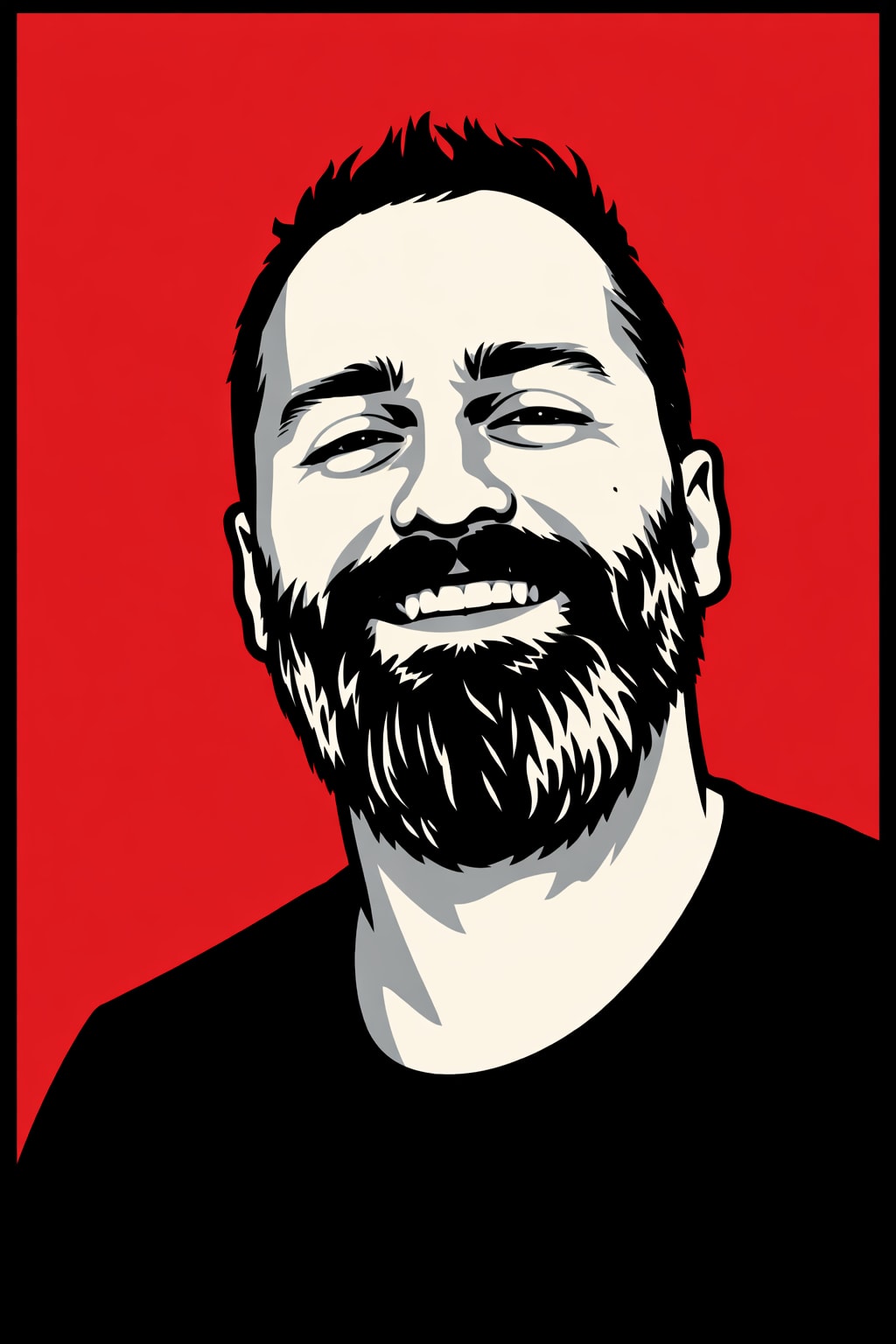
인물 사진을 강렬한 3~4색 스텐실 스타일의 그래픽 벡터 포스터 일러스트로 변환합니다.
- 추천 툴
- 이미지 생성AI 분류
- 쓰인 기법
- 출력 형식 지정
프롬프트 원문
Transform the uploaded portrait into a high-contrast vector poster illustration.

Style requirements:
- Bold stencil / propaganda poster aesthetic
- Flat vector art
- 3–4 color palette only
- Solid red background
- Face rendered in grayscale tones (2–3 flat shadow layers)
- Black thick outer contour lines
- No gradients
- No texture
- No photorealism
- Sharp clean edges
- Posterized shading
- Centered head composition
- Minimal but strong facial features
- Graphic design style
- Adobe Illustrator vector look
- High contrast
- Smooth geometric shadow shapes

Output:
Crisp, clean, scalable vector-style portrait.
한국어 풀이 보기(참고용)
업로드된 인물 사진을 대비가 강한 벡터 포스터 일러스트로 변환하세요.

스타일 요구사항:
- 대담한 스텐실 / 프로파간다 포스터 미학
- 플랫 벡터 아트
- 3~4가지 색상 팔레트만 사용
- 단색 빨간색 배경
- 그레이스케일 톤으로 표현된 얼굴 (2~3개의 평면 그림자 레이어)
- 검은색 두꺼운 외곽선
- 그라데이션 없음
- 질감 없음
- 실사 느낌 없음
- 날카롭고 깔끔한 가장자리
- 포스터화된 셰이딩
- 중앙 배치된 얼굴 구도
- 절제되었지만 강렬한 이목구비
- 그래픽 디자인 스타일
- 어도비 일러스트레이터 벡터 느낌
- 높은 대비
- 부드러운 기하학적 그림자 모양

출력:
선명하고 깔끔하며 확장 가능한 벡터 스타일의 초상화.
- 활용인물 사진을 함께 첨부하여 스타일 변환 지시문으로 활용하세요.
- 활용배경 색상(Solid red background)을 브랜드 컬러나 선호 색상으로 수정해보세요.
출처 · prompts.chat · High-Contrast Stencil Vector Poster Illustration — 원문은 출처에 게시된 그대로이며, 권리는 원작자에게 있습니다.
원작 결과 이미지
원문 작성자(Halil Nuroğlu)가 prompts.chat 에 올린 결과입니다. 원본 주소에서 표시됩니다.
mopick 개선안
원문을 더 잘 동작하게 고쳐 쓴 프롬프트
원문을 그대로 넣으면 AI 가 매번 다르게 답하거나 중요한 부분을 빠뜨릴 수 있습니다. 개선안은 원문의 뜻과 언어는 그대로 두고 역할 · 바꿔 넣을 입력 칸 · 결과 형식 · 지킬 조건을 보완해 다시 쓴 버전입니다. 원문과 같은 곳(ChatGPT · Claude 등)에 그대로 붙여 넣어 쓰면 됩니다.
AI 자체 평가 — 개선안을 쓴 AI 가 명확성 · 구체성 · 결과 형식 · 재사용성 기준(100점)으로 직접 매긴 점수 · 결과를 돌려 검증한 값은 아님
원문의 문제 → 개선안에서 고친 점
입력 칸레슨 05 배우기 ›
원문 · 없음바꿔 넣을 자리가 표시돼 있지 않아 쓸 때마다 원문을 직접 고쳐야 했습니다.
개선 · 2개[subject/uploaded portrait] · [subject]
고친 이유 (개선안을 만든 AI 의 설명)
- 1입력 대상과 구도를 명확히 지정하도록 [대괄호] 파라미터 추가
- 2스타일 요구사항을 구도·색상·렌더링 범주별로 구조화해 가독성 향상
- 3최종 결과물의 용도와 렌더링 기준을 명시하여 출력 안정성 강화
이 개선안에 쓰인 기법 — 프롬프트 클래스에서 배우기
원문
Transform the uploaded portrait into a high-contrast vector poster illustration.

Style requirements:
- Bold stencil / propaganda poster aesthetic
- Flat vector art
- 3–4 color palette only
- Solid red background
- Face rendered in grayscale tones (2–3 flat shadow layers)
- Black thick outer contour lines
- No gradients
- No texture
- No photorealism
- Sharp clean edges
- Posterized shading
- Centered head composition
- Minimal but strong facial features
- Graphic design style
- Adobe Illustrator vector look
- High contrast
- Smooth geometric shadow shapes

Output:
Crisp, clean, scalable vector-style portrait.
개선안 · 색칠한 [칸]에 내 내용을 넣어 쓰세요
Transform [subject/uploaded portrait] into a high-contrast vector poster illustration in a bold stencil propaganda style.

Visual Rules:
- Composition: Centered head-and-shoulders portrait of [subject] with strong, minimal facial features.
- Palette: Strictly 3–4 flat colors (solid red background, 2–3 flat grayscale shadow layers, and thick black contour lines).
- Rendering: Flat vector graphic art with sharp geometric shadow shapes, posterized shading, and crisp clean edges.
- Style Constraints: No gradients, no textures, no noise, and no photorealism. Clean screen-printed aesthetic.

Output: High-resolution, crisp, scalable vector-style illustration of [subject].
같은 분야 프롬프트 이미지 · 영상
더 보기 ›- 원작 결과영상
이미지 · 영상 · Seedance 2.5
25초 연속 SF VFX 씬 연출
25초간 끊김 없이 4개 세계관을 포탈로 넘나드는 고품질 헐리우드 액션 VFX 숏을 연출할 때 사용합니다.
기법 · 타임라인별 지시 · 시각 연출 상세화 · 카메라 앵글 지정
- 원작 결과영상
이미지 · 영상 · 공통
숏폼 애니-실사 전환 영상
애니메이션 오프닝에서 실사 영상으로 자연스럽게 전환되는 몰입감 넘치는 숏폼 바이럴 영상을 연출할 때 활용합니다.
기법 · 역할 부여 · 상세 장면 지시 · 스타일 및 음향 지정
이미지 · 영상 · 공통
4구간 시네마틱 씬 연출
32초 분량의 영상을 8초씩 4개 구간으로 나누어 긴장감 넘치는 시네마틱 액션 장면을 기획합니다.
기법 · 역할 부여 · 시간대별 세분화 · 묘사 지시