

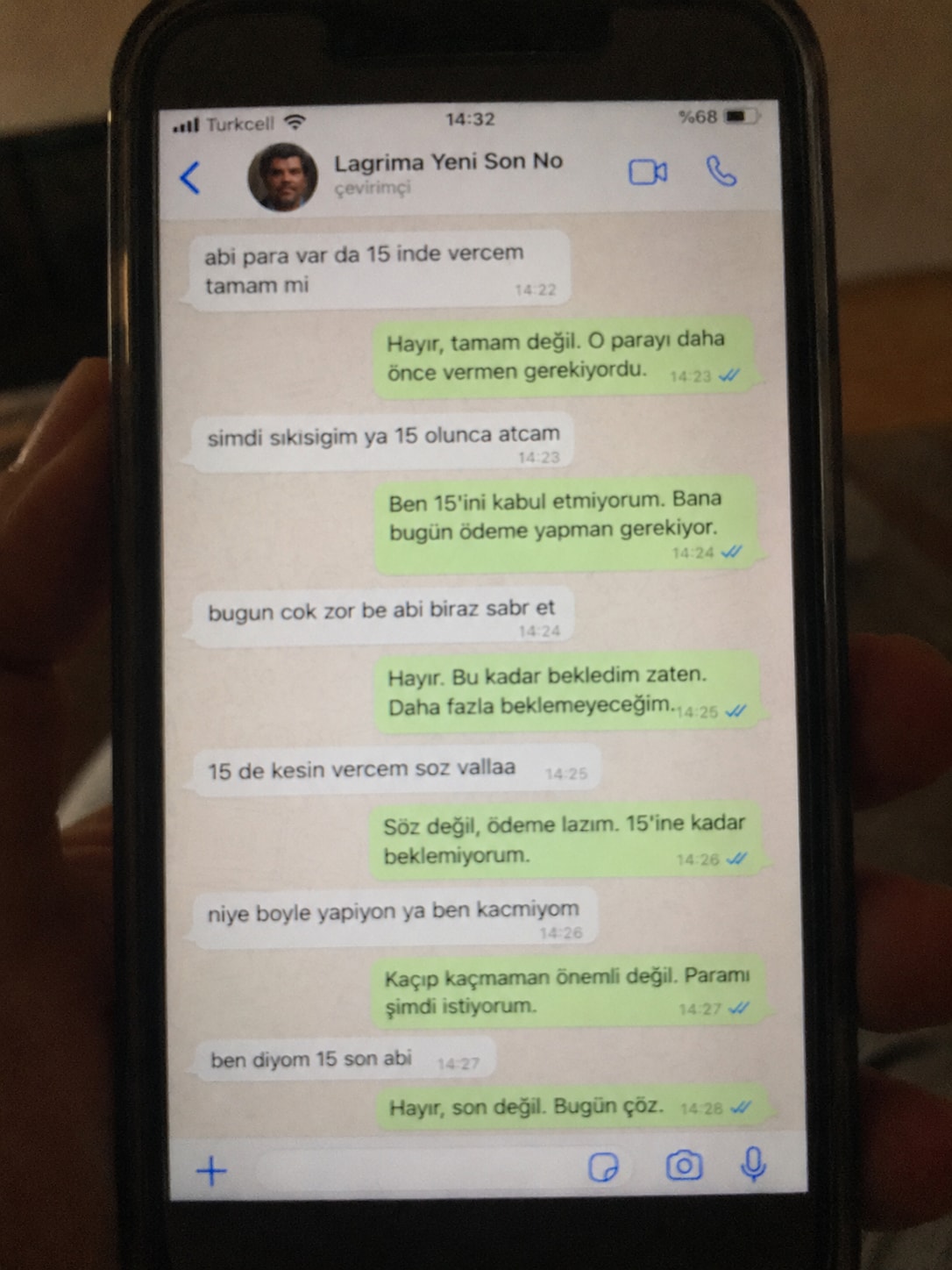
현실적인 스마트폰 캡처 연출
진짜 휴대폰으로 촬영한 듯한 노이즈와 조명이 반영된 메신저 화면 연출 이미지를 생성할 때 활용합니다.
- 추천 툴
- MidjourneyAI 분류
- 쓰인 기법
- 시각적 질감 묘사 · 앵글 및 디테일 제약 · 맥락 구성
프롬프트 원문
Create a realistic, poorly taken amateur photo of a physical smartphone showing a WhatsApp chat on its screen.

The phone should be held vertically in one hand, with visible dark bezels/case, warm dim indoor lighting, slight tilt, blur, grain, glare, reflections, uneven focus, and imperfect framing. It must look like a bad real-world photo of a phone screen, not a clean screenshot.

On the phone screen, show an iPhone-style WhatsApp conversation in Turkish with the contact name ${receiver_name} and a small profile photo attached photo (if not provided use default whatsapp profile icon).

Chat subject:
${talk_subject}

Generate the WhatsApp dialogue naturally based on the subject above. The contact’s messages should be in ${language_name:Turkish} language and ${talk_style} (e.g. broken ${language_name:Turkish} with typos and awkward wording. My messages should be correct ${language_name:Turkish} with no typos). Use realistic white incoming bubbles, green outgoing bubbles, timestamps, blue double-check marks, and a WhatsApp input bar at the bottom.

Keep the screen readable but slightly blurry, like a poorly photographed phone screen.
한국어 풀이 보기(참고용)
화면에 왓츠앱 대화가 떠 있는 실제 스마트폰을 손으로 찍은 듯한 사실적이고 어설픈 아마추어 사진을 생성하세요.

스마트폰은 한 손으로 세로로 들고 있어야 하며, 어두운 베젤/케이스, 따뜻하고 어두운 실내 조명, 약간의 기울어짐, 흐림, 노이즈, 반사광, 불균일한 초점, 불완전한 프레임이 보여야 합니다. 깔끔한 캡처본이 아니라 현실의 서툰 촬영 사진처럼 보여야 합니다.

폰 화면에는 연락처 이름 ${receiver_name}과 작은 프로필 사진이 있는 아이폰 스타일의 왓츠앱 대화를 보여주세요.

대화 주제:
${talk_subject}

위 주제를 바탕으로 대화를 자연스럽게 생성하세요. 상대방 메시지는 ${language_name:터키어}와 ${talk_style}(예: 오타와 어색한 문장의 깨진 터키어)로 작성하고, 내 메시지는 오타 없는 올바른 언어로 작성하세요. 하단에는 사실적인 수신용 흰색 말풍선, 발신용 초록색 말풍선, 타임스탬프, 파란색 체크 표시, 입력창을 포함하세요.

잘못 촬영된 스마트폰 화면처럼 읽을 수는 있지만 약간 흐릿하게 유지하세요.- 활용glare, blur, grain, imperfect framing 등의 키워드로 AI 인공물의 매끄러움을 제거합니다.
- 활용소셜 미디어 바이럴이나 스토리텔링용 컷으로 실감나는 이미지 연출이 가능합니다.
출처 · prompts.chat · Realistic Amateur Phone Photo with WhatsApp Chat — 원문은 출처에 게시된 그대로이며, 권리는 원작자에게 있습니다.
원작 결과 이미지
원문 작성자(Fatih Kadir Akın)가 prompts.chat 에 올린 결과입니다. 원본 주소에서 표시됩니다.
mopick 개선안
원문을 더 잘 동작하게 고쳐 쓴 프롬프트
원문을 그대로 넣으면 AI 가 매번 다르게 답하거나 중요한 부분을 빠뜨릴 수 있습니다. 개선안은 원문의 뜻과 언어는 그대로 두고 역할 · 바꿔 넣을 입력 칸 · 결과 형식 · 지킬 조건을 보완해 다시 쓴 버전입니다. 원문과 같은 곳(ChatGPT · Claude 등)에 그대로 붙여 넣어 쓰면 됩니다.
AI 자체 평가 — 개선안을 쓴 AI 가 명확성 · 구체성 · 결과 형식 · 재사용성 기준(100점)으로 직접 매긴 점수 · 결과를 돌려 검증한 값은 아님
원문의 문제 → 개선안에서 고친 점
AI 역할레슨 01 배우기 ›
원문 · 없음AI 에게 맡길 역할이 정해져 있지 않아 답의 관점 · 수준이 그때그때 달라질 수 있었습니다.
개선 · 역할을 정함Act as an expert prompt engineer. Generate a realistic amateur photo of a physical smartph
입력 칸레슨 05 배우기 ›
원문 · 3개바꿔 넣을 자리가 일부만 표시돼 있어 쓸 때마다 원문을 고쳐야 했습니다.
개선 · 6개[Receiver Name] · [Talk Subject] · [Language, e.g., Turkish]
고친 이유 (개선안을 만든 AI 의 설명)
- 1변수 형식을 [대괄호] 표준 구문으로 통일함
- 2촬영 스타일, UI, 대화 규칙을 구체적으로 분리
- 3이미지 구도와 텍스트 생성 지침의 명확성 강화
이 개선안에 쓰인 기법 — 프롬프트 클래스에서 배우기
원문
Create a realistic, poorly taken amateur photo of a physical smartphone showing a WhatsApp chat on its screen.

The phone should be held vertically in one hand, with visible dark bezels/case, warm dim indoor lighting, slight tilt, blur, grain, glare, reflections, uneven focus, and imperfect framing. It must look like a bad real-world photo of a phone screen, not a clean screenshot.

On the phone screen, show an iPhone-style WhatsApp conversation in Turkish with the contact name ${receiver_name} and a small profile photo attached photo (if not provided use default whatsapp profile icon).

Chat subject:
${talk_subject}

Generate the WhatsApp dialogue naturally based on the subject above. The contact’s messages should be in ${language_name:Turkish} language and ${talk_style} (e.g. broken ${language_name:Turkish} with typos and awkward wording. My messages should be correct ${language_name:Turkish} with no typos). Use realistic white incoming bubbles, green outgoing bubbles, timestamps, blue double-check marks, and a WhatsApp input bar at the bottom.

Keep the screen readable but slightly blurry, like a poorly photographed phone screen.
개선안 · 색칠한 [칸]에 내 내용을 넣어 쓰세요
Act as an expert prompt engineer. Generate a realistic amateur photo of a physical smartphone held vertically in one hand, showing an iPhone-style WhatsApp chat screen.

[Visual Style & Environment]
- Aesthetic: Imperfect snapshot with warm dim indoor lighting, slight tilt, motion blur, film grain, screen glare, reflections, uneven focus, and uncentered framing.
- Phone Details: Dark bezels or protective case visible. Must look like an authentic real-life photo of a physical phone screen, not a clean digital mockup or screenshot.

[WhatsApp UI & Layout]
- Top Bar: Contact name '[Receiver Name]' with a profile photo (use default WhatsApp avatar if not specified).
- Chat Elements: White incoming bubbles, green outgoing bubbles, realistic timestamps, blue double-check marks, and a standard bottom input bar.
- Legibility: Screen text should be slightly blurry yet readable.

[Dialogue & Content Rules]
- Topic: [Talk Subject]
- Language: [Language, e.g., Turkish]
- Incoming Messages: Written in [Talk Style, e.g., broken text with typos and awkward phrasing].
- Outgoing Messages: Written in correct language with proper grammar and no typos.
같은 분야 프롬프트 이미지 · 영상
더 보기 ›- 원작 결과영상
이미지 · 영상 · Seedance 2.5
25초 연속 SF VFX 씬 연출
25초간 끊김 없이 4개 세계관을 포탈로 넘나드는 고품질 헐리우드 액션 VFX 숏을 연출할 때 사용합니다.
기법 · 타임라인별 지시 · 시각 연출 상세화 · 카메라 앵글 지정
- 원작 결과영상
이미지 · 영상 · 공통
숏폼 애니-실사 전환 영상
애니메이션 오프닝에서 실사 영상으로 자연스럽게 전환되는 몰입감 넘치는 숏폼 바이럴 영상을 연출할 때 활용합니다.
기법 · 역할 부여 · 상세 장면 지시 · 스타일 및 음향 지정
이미지 · 영상 · 공통
4구간 시네마틱 씬 연출
32초 분량의 영상을 8초씩 4개 구간으로 나누어 긴장감 넘치는 시네마틱 액션 장면을 기획합니다.
기법 · 역할 부여 · 시간대별 세분화 · 묘사 지시