

서울 지하철 코믹 영상 연출
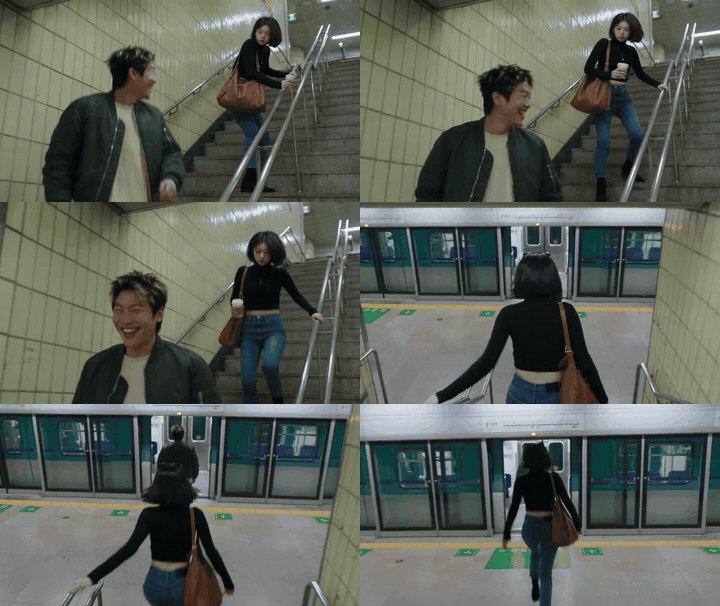
서울 지하철을 배경으로 한 사실적이고 코믹한 숏폼 영상 소스를 생성할 때 유용합니다.
- 추천 툴
- 이미지 생성AI 분류
- 쓰인 기법
- 맥락 설정 · 시각적 디테일 지정 · 분위기 묘사
프롬프트 원문
Create a live-action cinematic revenge-comedy video set in a Seoul subway station. Use realistic handheld camera movement, cold fluorescent lighting, teal-green accents, and real-time action.

Maintain identical faces, hairstyles, outfits, and location throughout. Include realistic physics, expressive reactions, cinematic close-ups, subway ambience, and clear white subtitles. Keep the action non-gory, the coffee spill visible, and the final dustbin landing unmistakable.
한국어 풀이 보기(참고용)
서울 지하철역을 배경으로 한 실사 시네마틱 복수극 코미디 영상을 제작하세요. 사실적인 핸드헬드 카메라 움직임, 차가운 형광등 조명, 청록색 포인트 컬러, 실시간 액션을 활용하세요.

영상 내내 동일한 얼굴, 헤어스타일, 의상, 장소를 유지해야 합니다. 사실적인 물리 효과, 풍부한 표정 변화, 시네마틱한 근접 촬영, 지하철 특유의 분위기, 선명한 흰색 자막을 포함하세요. 잔인한 장면은 제외하고, 쏟아지는 커피와 마지막에 쓰레기통에 처박히는 장면이 확실히 보이게 하세요.
- 활용'identical faces' 지시어로 영상 내내 캐릭터의 일관성을 유지할 수 있습니다.
- 활용지하철 소음과 자막 설정을 미리 포함해 후반 편집 시간을 대폭 단축합니다.
- 활용배경 장소를 다른 도시의 역으로 바꿔서 다양한 글로벌 버전으로 응용 가능합니다.
출처 · GitHub ai-boost/awesome-image-video-prompts — 원문은 출처에 게시된 그대로이며, 권리는 원작자에게 있습니다.
영상 결과
mopick 개선안
원문을 더 잘 동작하게 고쳐 쓴 프롬프트
원문을 그대로 넣으면 AI 가 매번 다르게 답하거나 중요한 부분을 빠뜨릴 수 있습니다. 개선안은 원문의 뜻과 언어는 그대로 두고 역할 · 바꿔 넣을 입력 칸 · 결과 형식 · 지킬 조건을 보완해 다시 쓴 버전입니다. 원문과 같은 곳(ChatGPT · Claude 등)에 그대로 붙여 넣어 쓰면 됩니다.
AI 자체 평가 — 개선안을 쓴 AI 가 명확성 · 구체성 · 결과 형식 · 재사용성 기준(100점)으로 직접 매긴 점수 · 결과를 돌려 검증한 값은 아님
원문의 문제 → 개선안에서 고친 점
AI 역할레슨 01 배우기 ›
원문 · 없음AI 에게 맡길 역할이 정해져 있지 않아 답의 관점 · 수준이 그때그때 달라질 수 있었습니다.
개선 · 역할을 정함Act as a professional cinematographer. Create a [high-quality, 4K] live-action cinematic r
입력 칸레슨 05 배우기 ›
원문 · 없음바꿔 넣을 자리가 표시돼 있지 않아 쓸 때마다 원문을 직접 고쳐야 했습니다.
개선 · 4개[high-quality, 4K] · [a gritty, handheld camera style with] · [consistent character identity, wardrobe, and environment] 외 1개
고친 이유 (개선안을 만든 AI 의 설명)
- 1역할(cinematographer)을 부여해 전문적인 영상미와 기술적 지시를 강화함.
- 2일관성을 위한 제약 조건과 구체적인 영상 흐름을 추가하여 품질을 높임.
- 3화질, 색감, 자막 위치 등 시각적 명확성을 높이는 기술적 묘사를 보강함.
이 개선안에 쓰인 기법 — 프롬프트 클래스에서 배우기
원문
Create a live-action cinematic revenge-comedy video set in a Seoul subway station. Use realistic handheld camera movement, cold fluorescent lighting, teal-green accents, and real-time action.

Maintain identical faces, hairstyles, outfits, and location throughout. Include realistic physics, expressive reactions, cinematic close-ups, subway ambience, and clear white subtitles. Keep the action non-gory, the coffee spill visible, and the final dustbin landing unmistakable.
개선안 · 색칠한 [칸]에 내 내용을 넣어 쓰세요
Act as a professional cinematographer. Create a [high-quality, 4K] live-action cinematic revenge-comedy video set in a Seoul subway station. Use [a gritty, handheld camera style with] cold fluorescent lighting and teal-green color grading. Ensure [consistent character identity, wardrobe, and environment]. Include [realistic physics, sharp close-ups on expressive faces, and ambient subway sounds]. [Constraint: The sequence must show a deliberate coffee spill leading to a clear, non-gory landing in a dustbin.] Output with [clear, centered white subtitles at the bottom].
같은 분야 프롬프트 이미지 · 영상
더 보기 ›- 원작 결과영상
이미지 · 영상 · Seedance 2.5
25초 연속 SF VFX 씬 연출
25초간 끊김 없이 4개 세계관을 포탈로 넘나드는 고품질 헐리우드 액션 VFX 숏을 연출할 때 사용합니다.
기법 · 타임라인별 지시 · 시각 연출 상세화 · 카메라 앵글 지정
- 원작 결과영상
이미지 · 영상 · 공통
숏폼 애니-실사 전환 영상
애니메이션 오프닝에서 실사 영상으로 자연스럽게 전환되는 몰입감 넘치는 숏폼 바이럴 영상을 연출할 때 활용합니다.
기법 · 역할 부여 · 상세 장면 지시 · 스타일 및 음향 지정
이미지 · 영상 · 공통
4구간 시네마틱 씬 연출
32초 분량의 영상을 8초씩 4개 구간으로 나누어 긴장감 넘치는 시네마틱 액션 장면을 기획합니다.
기법 · 역할 부여 · 시간대별 세분화 · 묘사 지시