

레고 피규어 캐릭터 변환
참조 이미지 속 인물을 공식 레고 미니피규어 스타일 캐릭터로 입체 변환할 때 사용합니다.
- 추천 툴
- 이미지 생성AI 분류
- 쓰인 기법
- 역할 부여 · 상세 조건 제시 · 연출 지정
프롬프트 원문
Transform the subject in the reference image into a LEGO minifigure–style character.

Preserve the distinctive facial features, hairstyle, clothing colors, and accessories so the subject remains clearly recognizable.

The character should be rendered as a classic LEGO minifigure with:
- A cylindrical yellow (or skin-tone LEGO) head
- Simple LEGO facial expression (friendly smile, dot eyes or classic LEGO eyes)
- Blocky hands and arms with LEGO proportions
- Short, rigid LEGO legs

Clothing and accessories should be translated into LEGO-printed torso designs (simple graphics, clean lines, no fabric texture).

Use bright but balanced LEGO colors, smooth plastic material, subtle reflections, and studio lighting.

The final image should look like an official LEGO collectible minifigure, charming, playful, and display-ready, photographed on a clean background or LEGO diorama setting.
한국어 풀이 보기(참고용)
참조 이미지의 인물을 레고 미니피규어 스타일 캐릭터로 변환하세요.

인물을 명확히 알아볼 수 있도록 특징적인 이목구비, 헤어스타일, 의상 색상, 액세서리를 유지하세요.

캐릭터는 다음 요소를 갖춘 클래식 레고 미니피규어로 렌더링되어야 합니다:
- 원통형 노란색(또는 피부색 레고) 머리
- 단순한 레고 표정(친근한 미소, 점 모양 눈 또는 클래식 레고 눈)
- 레고 비율의 투박한 손과 팔
- 짧고 단단한 레고 다리

의상과 액세서리는 레고 토르소 프린팅 디자인(단순한 그래픽, 깔끔한 선, 직물 질감 없음)으로 변환되어야 합니다.

밝지만 균형 잡힌 레고 색상, 매끄러운 플라스틱 재질, 은은한 반사광, 스튜디오 조명을 사용하세요.

최종 이미지는 깔끔한 배경 또는 레고 디오라마 세트에서 촬영된 매력적이고 장난스러우며 전시 가능한 공식 레고 미니피규어처럼 보여야 합니다.
- 활용인물 사진을 레퍼런스로 함께 업로드하면 이목구비와 헤어 스타일이 정확하게 반영됩니다.
- 활용배경으로 깔끔한 스튜디오 또는 특정 레고 디오라마 무대를 지정해 완성도를 높여보세요.
출처 · prompts.chat · LEGO Minifigure Character Transformation — 원문은 출처에 게시된 그대로이며, 권리는 원작자에게 있습니다.
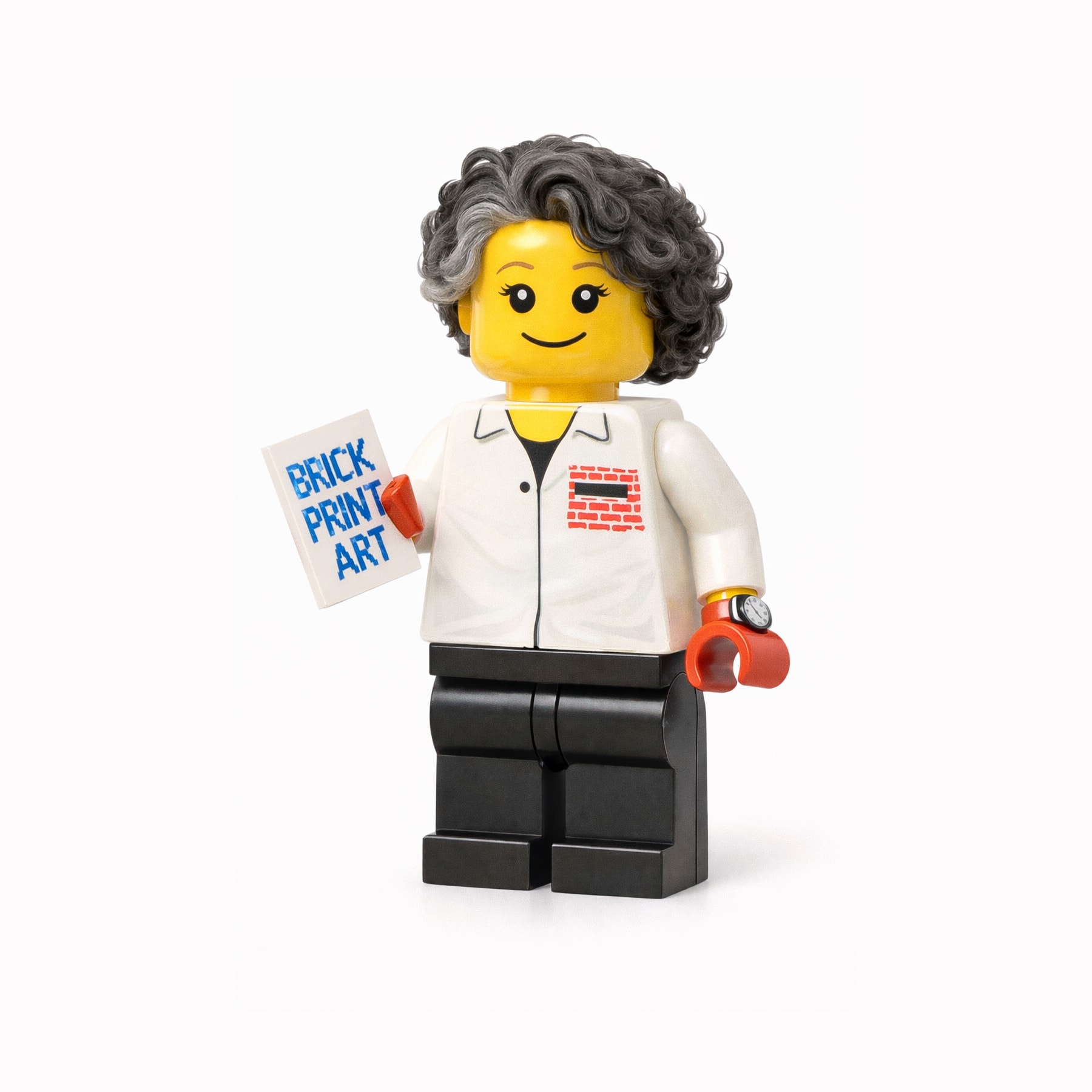
원작 결과 이미지
원문 작성자(Ersin Yılmaz)가 prompts.chat 에 올린 결과입니다. 원본 주소에서 표시됩니다.
mopick 개선안
원문을 더 잘 동작하게 고쳐 쓴 프롬프트
원문을 그대로 넣으면 AI 가 매번 다르게 답하거나 중요한 부분을 빠뜨릴 수 있습니다. 개선안은 원문의 뜻과 언어는 그대로 두고 역할 · 바꿔 넣을 입력 칸 · 결과 형식 · 지킬 조건을 보완해 다시 쓴 버전입니다. 원문과 같은 곳(ChatGPT · Claude 등)에 그대로 붙여 넣어 쓰면 됩니다.
AI 자체 평가 — 개선안을 쓴 AI 가 명확성 · 구체성 · 결과 형식 · 재사용성 기준(100점)으로 직접 매긴 점수 · 결과를 돌려 검증한 값은 아님
원문의 문제 → 개선안에서 고친 점
입력 칸레슨 05 배우기 ›
원문 · 없음바꿔 넣을 자리가 표시돼 있지 않아 쓸 때마다 원문을 직접 고쳐야 했습니다.
개선 · 8개[Task] · [Input Subject / Reference Image] · [Key Subject Features to Retain] 외 5개
고친 이유 (개선안을 만든 AI 의 설명)
- 1대괄호 파라미터를 추가하여 다양한 인물 프롬프트 재사용성 향상
- 2섹션별 구조화를 통해 AI 모델의 가중치 인식 명확성 개선
- 3질감 및 촬영 기법(마크로, 성형선)을 구체화하여 렌더링 품질 증대
이 개선안에 쓰인 기법 — 프롬프트 클래스에서 배우기
원문
Transform the subject in the reference image into a LEGO minifigure–style character.

Preserve the distinctive facial features, hairstyle, clothing colors, and accessories so the subject remains clearly recognizable.

The character should be rendered as a classic LEGO minifigure with:
- A cylindrical yellow (or skin-tone LEGO) head
- Simple LEGO facial expression (friendly smile, dot eyes or classic LEGO eyes)
- Blocky hands and arms with LEGO proportions
- Short, rigid LEGO legs

Clothing and accessories should be translated into LEGO-printed torso designs (simple graphics, clean lines, no fabric texture).

Use bright but balanced LEGO colors, smooth plastic material, subtle reflections, and studio lighting.

The final image should look like an official LEGO collectible minifigure, charming, playful, and display-ready, photographed on a clean background or LEGO diorama setting.
개선안 · 색칠한 [칸]에 내 내용을 넣어 쓰세요
[Task]: Transform [Input Subject / Reference Image] into an official, display-ready LEGO minifigure collectible.

[Key Subject Features to Retain]:
- Replicate distinctive facial features, hairstyle, signature clothing colors, and accessories of [Subject Name] for instant recognition.

[Minifigure Specifications]:
- Head: Standard cylindrical head with [classic yellow / realistic skin-tone] smooth plastic finish.
- Face: Minimalist LEGO facial features (classic dot eyes, simple friendly expression).
- Anatomy: Proportional blocky torso, standard C-clamp hands, and rigid legs.
- Outfit: Translate clothing into clean graphic prints on the torso/legs (no fabric textures).

[Style & Technical Render]:
- Material: Smooth molded plastic with subtle highlights, reflections, and fine seam lines.
- Lighting & Background: Studio macro photography on a [clean neutral background / custom LEGO diorama setting]. Bright, balanced colors.
같은 분야 프롬프트 이미지 · 영상
더 보기 ›- 원작 결과영상
이미지 · 영상 · Seedance 2.5
25초 연속 SF VFX 씬 연출
25초간 끊김 없이 4개 세계관을 포탈로 넘나드는 고품질 헐리우드 액션 VFX 숏을 연출할 때 사용합니다.
기법 · 타임라인별 지시 · 시각 연출 상세화 · 카메라 앵글 지정
- 원작 결과영상
이미지 · 영상 · 공통
숏폼 애니-실사 전환 영상
애니메이션 오프닝에서 실사 영상으로 자연스럽게 전환되는 몰입감 넘치는 숏폼 바이럴 영상을 연출할 때 활용합니다.
기법 · 역할 부여 · 상세 장면 지시 · 스타일 및 음향 지정
이미지 · 영상 · 공통
4구간 시네마틱 씬 연출
32초 분량의 영상을 8초씩 4개 구간으로 나누어 긴장감 넘치는 시네마틱 액션 장면을 기획합니다.
기법 · 역할 부여 · 시간대별 세분화 · 묘사 지시