

개념 설명 3D 디오라마
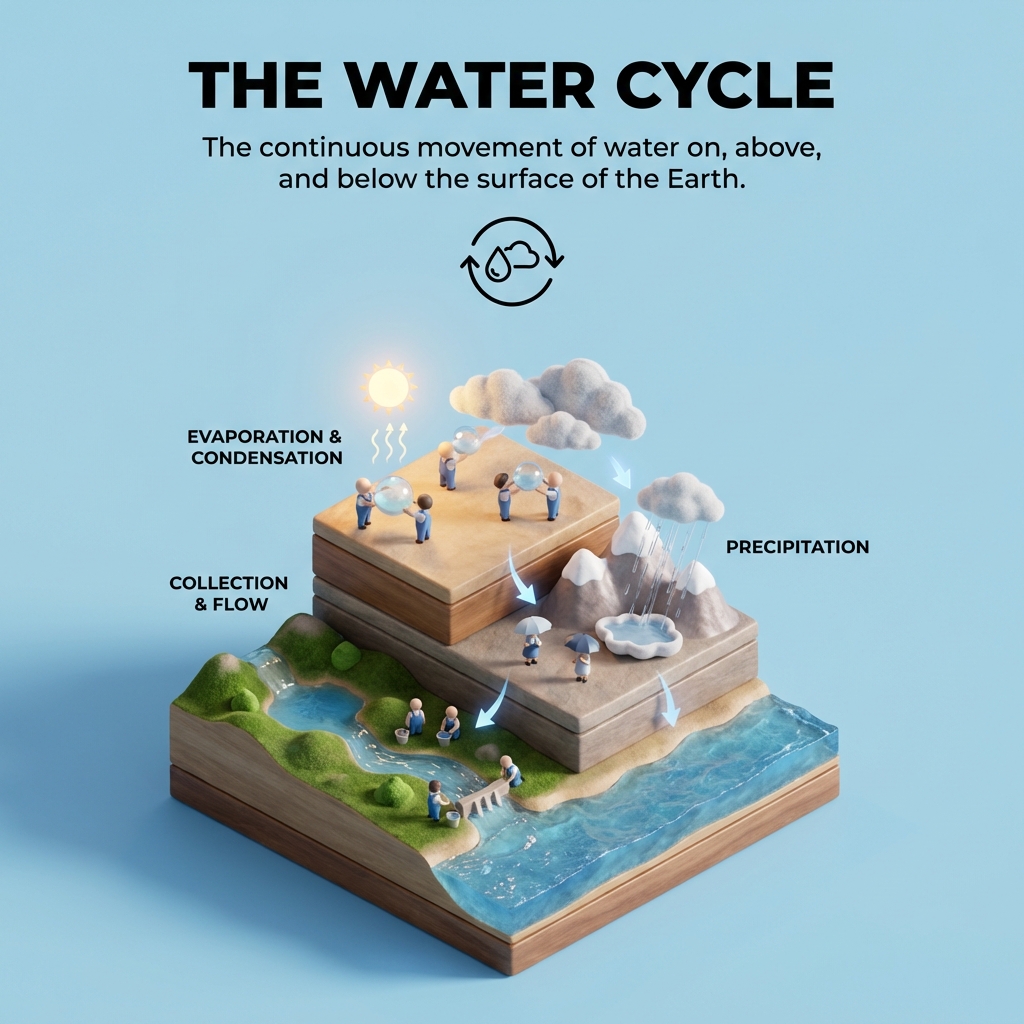
복잡한 비즈니스 프로세스나 개념을 45도 조감도 형태의 3D 디오라마 이미지로 시각화합니다.
- 추천 툴
- 이미지 생성AI 분류
- 쓰인 기법
- 구조화된 서식 · 출력 형식 지정
프롬프트 원문
Create a clear, 45° top-down isometric miniature 3D educational diorama explaining [PROCESS / CONCEPT].

Use soft refined textures, realistic PBR materials, and gentle lifelike lighting.

Build a stepped or layered diorama base showing each stage of the process with subtle arrows or paths.

Include tiny stylized figures interacting with each stage (no facial details).

Use a clean solid ${background_color} background.
At the top-center, display ${process_name} in large bold text, directly beneath it show a short explanation subtitle, and place a minimal symbolic icon below.

All text must automatically match the background contrast (white or black).
한국어 풀이 보기(참고용)
[프로세스 / 개념]을 설명하는 선명한 45° 탑다운 아이소메트릭 미니어처 3D 교육용 디오라마를 생성하세요.

부드럽고 정교한 텍스처, 사실적인 PBR 재질, 은은하고 생생한 조명을 사용하세요.

각 프로세스 단계를 미세한 화살표나 경로로 보여주는 계단식 또는 레이어드 디오라마 베이스를 구축하세요.

각 단계와 상호작용하는 작은 스타일화된 피규어(얼굴 세부 정보 없음)를 포함하세요.

깨끗한 단색 [배경색] 배경을 사용하세요.
상단 중앙에 [프로세스 이름]을 크고 굵은 텍스트로 표시하고, 그 바로 아래에 짧은 설명 부제목과 최소한의 상징적 아이콘을 배치하세요.

모든 텍스트는 배경 대비(흰색 또는 검은색)에 자동으로 맞춰져야 합니다.
- 활용[프로세스 / 개념] 자리에 '신제품 제조 공정'이나 '서비스 이용 절차'를 넣으면 인포그래픽으로 쓰기 좋습니다.
- 활용발표 자료나 아티클 시각 자료로 깔끔한 아이소메트릭 그래픽이 필요할 때 활용해 보세요.
출처 · prompts.chat · “How It Works” Educational Dioramas — 원문은 출처에 게시된 그대로이며, 권리는 원작자에게 있습니다.
원작 결과 이미지
원문 작성자(Huss-Alamodi)가 prompts.chat 에 올린 결과입니다. 원본 주소에서 표시됩니다.
mopick 개선안
원문을 더 잘 동작하게 고쳐 쓴 프롬프트
원문을 그대로 넣으면 AI 가 매번 다르게 답하거나 중요한 부분을 빠뜨릴 수 있습니다. 개선안은 원문의 뜻과 언어는 그대로 두고 역할 · 바꿔 넣을 입력 칸 · 결과 형식 · 지킬 조건을 보완해 다시 쓴 버전입니다. 원문과 같은 곳(ChatGPT · Claude 등)에 그대로 붙여 넣어 쓰면 됩니다.
AI 자체 평가 — 개선안을 쓴 AI 가 명확성 · 구체성 · 결과 형식 · 재사용성 기준(100점)으로 직접 매긴 점수 · 결과를 돌려 검증한 값은 아님
원문의 문제 → 개선안에서 고친 점
입력 칸레슨 05 배우기 ›
원문 · 3개바꿔 넣을 자리가 일부만 표시돼 있어 쓸 때마다 원문을 고쳐야 했습니다.
개선 · 6개[BACKGROUND COLOR] · [PROCESS NAME] · [SHORT EXPLANATION]
고친 이유 (개선안을 만든 AI 의 설명)
- 1혼용된 변수 표기법을 대괄호 형식으로 표준화함.
- 2스타일, 배치, 텍스트 섹션을 구체적으로 범주화함.
- 3시각적 흐름과 텍스트 대비 조건을 명확히 보강함.
이 개선안에 쓰인 기법 — 프롬프트 클래스에서 배우기
원문
Create a clear, 45° top-down isometric miniature 3D educational diorama explaining [PROCESS / CONCEPT].

Use soft refined textures, realistic PBR materials, and gentle lifelike lighting.

Build a stepped or layered diorama base showing each stage of the process with subtle arrows or paths.

Include tiny stylized figures interacting with each stage (no facial details).

Use a clean solid ${background_color} background.
At the top-center, display ${process_name} in large bold text, directly beneath it show a short explanation subtitle, and place a minimal symbolic icon below.

All text must automatically match the background contrast (white or black).
개선안 · 색칠한 [칸]에 내 내용을 넣어 쓰세요
High-detail 45° top-down isometric miniature 3D educational diorama explaining [PROCESS / CONCEPT].

Style & Materials: Soft refined textures, realistic PBR materials, gentle lifelike studio lighting, and soft ambient shadows.

Composition & Layout: Stepped or layered floating diorama base illustrating sequential stages from left to right, connected by subtle arrows or paths. Include tiny stylized faceless figures actively interacting with each stage.

Background: Clean solid [BACKGROUND COLOR] background.

Text & Header: At the top-center, render '[PROCESS NAME]' in large bold typography, followed by a short explanation subtitle '[SHORT EXPLANATION]', with a minimal symbolic icon placed below. Text color must automatically contrast sharply with the background (pure white or black).
같은 분야 프롬프트 이미지 · 영상
더 보기 ›- 원작 결과영상
이미지 · 영상 · Seedance 2.5
25초 연속 SF VFX 씬 연출
25초간 끊김 없이 4개 세계관을 포탈로 넘나드는 고품질 헐리우드 액션 VFX 숏을 연출할 때 사용합니다.
기법 · 타임라인별 지시 · 시각 연출 상세화 · 카메라 앵글 지정
- 원작 결과영상
이미지 · 영상 · 공통
숏폼 애니-실사 전환 영상
애니메이션 오프닝에서 실사 영상으로 자연스럽게 전환되는 몰입감 넘치는 숏폼 바이럴 영상을 연출할 때 활용합니다.
기법 · 역할 부여 · 상세 장면 지시 · 스타일 및 음향 지정
이미지 · 영상 · 공통
4구간 시네마틱 씬 연출
32초 분량의 영상을 8초씩 4개 구간으로 나누어 긴장감 넘치는 시네마틱 액션 장면을 기획합니다.
기법 · 역할 부여 · 시간대별 세분화 · 묘사 지시