

영롱한 유리 질감 3D 리텍스처
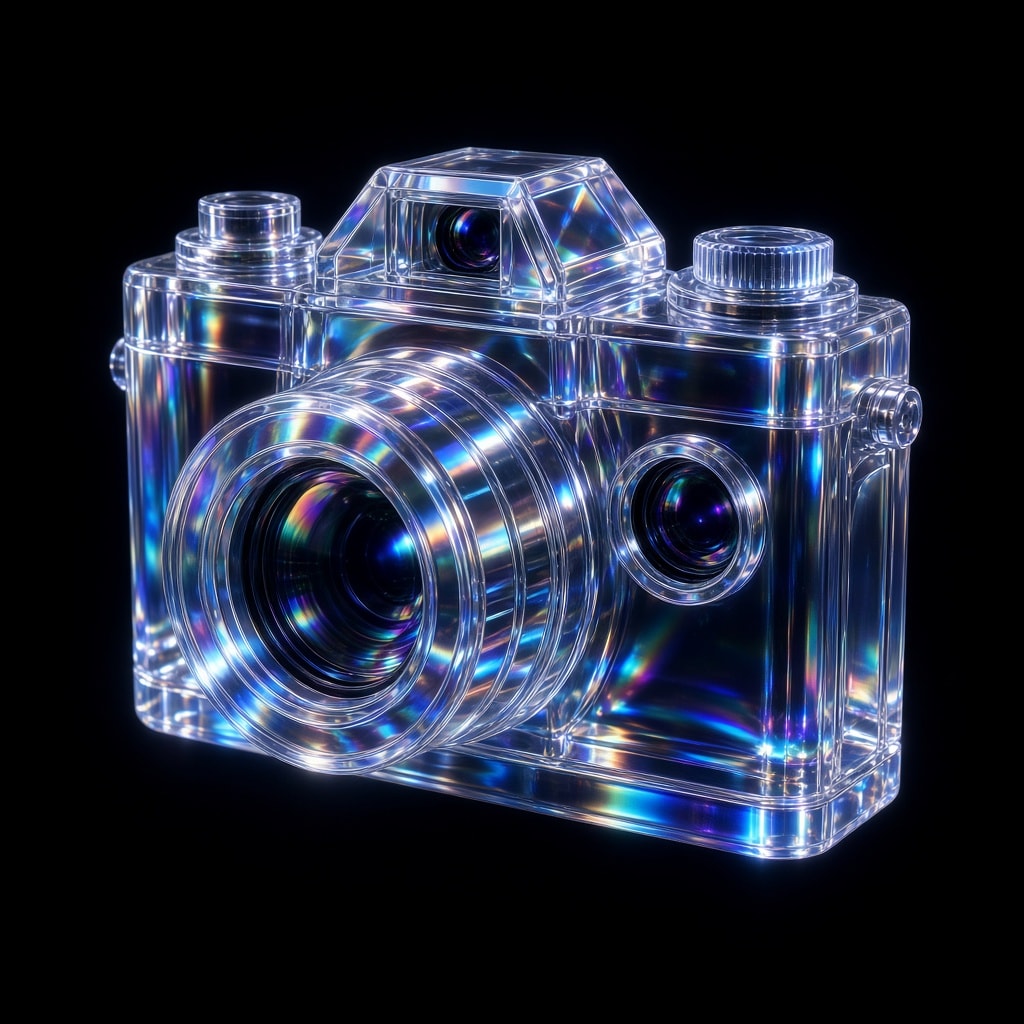
제품이나 캐릭터 이미지를 영롱한 오로라 광채의 3D 크리스탈 유리 렌더링 스타일로 변환할 때 사용합니다.
- 추천 툴
- 이미지 생성AI 분류
- 쓰인 기법
- JSON 구조화 · 질감 재정의 · 라이팅 디렉팅
프롬프트 원문
Retexture the image attached based on the JSON aesthetic below

{
  "style": "photorealistic 3D render",
  "material": "glass with transparent and iridescent effects",
  "surface_texture": "smooth, polished with subtle reflections and refractive effects",
  "lighting": {
    "type": "studio HDRI",
    "intensity": "high",
    "direction": "angled top-left key light and ambient fill",
    "accent_colors": ["blue", "green", "purple"],
    "reflections": true,
    "refractions": true,
    "dispersion_effects": true,
    "bloom": true
  },
  "color_scheme": {
    "primary": "transparent with iridescent blue, green, and purple hues",
    "secondary": "crystal-clear with subtle chromatic shifts",
    "highlights": "soft, glowing accents reflecting rainbow-like effects",
    "rim_light": "soft reflective light around edges"
  },
  "background": {
    "color": "black",
    "vignette": true,
    "texture": "none"
  },
  "post_processing": {
    "chromatic_aberration": true,
    "glow": true,
    "high_contrast": true,
    "sharp_details": true
  }
}
한국어 풀이 보기(참고용)
아래 JSON 에스테틱 지침에 따라 첨부된 이미지의 질감을 재구성하세요.

{
  "style": "사실적인 3D 렌더링",
  "material": "투명 및 무지개빛 오로라 효과가 있는 유리",
  "surface_texture": "은은한 반사 및 굴절 효과가 있는 매끄럽고 광택 나는 표면",
  "lighting": {
    "type": "스튜디오 HDRI",
    "intensity": "높음",
    "direction": "왼쪽 상단 대각선 주조명 및 앰비언트 핑 조명",
    "accent_colors": ["블루", "그린", "퍼플"],
    "reflections": true,
    "refractions": true,
    "dispersion_effects": true,
    "bloom": true
  },
  "color_scheme": {
    "primary": "무지개빛 블루, 그린, 퍼플 빛깔을 띤 투명",
    "secondary": "미세한 색수차 변화가 있는 크리스탈처럼 투명함",
    "highlights": "무지개 같은 효과를 반사하는 부드럽게 빛나는 하이라이트",
    "rim_light": "가장자리를 둘러싼 부드러운 반사광"
  },
  "background": {
    "color": "블랙",
    "vignette": true,
    "texture": "없음"
  },
  "post_processing": {
    "chromatic_aberration": true,
    "glow": true,
    "high_contrast": true,
    "sharp_details": true
  }
}- 활용ChatGPT(DALL-E)나 Image-to-Image 기능을 지원하는 생성형 AI 툴에 사진과 함께 전달하세요.
- 활용JSON 안의 accent_colors나 material 속성을 'metallic', 'ceramic' 등으로 바꾸면 다양한 재질로 재탄생시킬 수 있습니다.
출처 · prompts.chat · Iridescent Glass Retexture: JSON Style Prompt That Turns Any Uploaded Image into a Photoreal Crystal 3D Render — 원문은 출처에 게시된 그대로이며, 권리는 원작자에게 있습니다.
원작 결과 이미지
원문 작성자(Fatih Kadir Akın)가 prompts.chat 에 올린 결과입니다. 원본 주소에서 표시됩니다.
mopick 개선안
원문을 더 잘 동작하게 고쳐 쓴 프롬프트
원문을 그대로 넣으면 AI 가 매번 다르게 답하거나 중요한 부분을 빠뜨릴 수 있습니다. 개선안은 원문의 뜻과 언어는 그대로 두고 역할 · 바꿔 넣을 입력 칸 · 결과 형식 · 지킬 조건을 보완해 다시 쓴 버전입니다. 원문과 같은 곳(ChatGPT · Claude 등)에 그대로 붙여 넣어 쓰면 됩니다.
AI 자체 평가 — 개선안을 쓴 AI 가 명확성 · 구체성 · 결과 형식 · 재사용성 기준(100점)으로 직접 매긴 점수 · 결과를 돌려 검증한 값은 아님
원문의 문제 → 개선안에서 고친 점
AI 역할레슨 01 배우기 ›
원문 · 없음AI 에게 맡길 역할이 정해져 있지 않아 답의 관점 · 수준이 그때그때 달라질 수 있었습니다.
개선 · 역할을 정함Act as an expert 3D texture artist. Retexture the main subject in the input image [attache
입력 칸레슨 05 배우기 ›
원문 · 1개바꿔 넣을 자리가 일부만 표시돼 있어 쓸 때마다 원문을 고쳐야 했습니다.
개선 · 2개[attached_image]
고친 이유 (개선안을 만든 AI 의 설명)
- 1원형과 윤곽을 유지하도록 형태 보존 제약 조건 추가
- 23D 텍스처 아티스트 역할 지정으로 품질 향상
- 3입력 이미지 지정을 위한 [attached_image] 표기 추가
이 개선안에 쓰인 기법 — 프롬프트 클래스에서 배우기
원문
Retexture the image attached based on the JSON aesthetic below

{
  "style": "photorealistic 3D render",
  "material": "glass with transparent and iridescent effects",
  "surface_texture": "smooth, polished with subtle reflections and refractive effects",
  "lighting": {
    "type": "studio HDRI",
    "intensity": "high",
    "direction": "angled top-left key light and ambient fill",
    "accent_colors": ["blue", "green", "purple"],
    "reflections": true,
    "refractions": true,
    "dispersion_effects": true,
    "bloom": true
  },
  "color_scheme": {
    "primary": "transparent with iridescent blue, green, and purple hues",
    "secondary": "crystal-clear with subtle chromatic shifts",
    "highlights": "soft, glowing accents reflecting rainbow-like effects",
    "rim_light": "soft reflective light around edges"
  },
  "background": {
    "color": "black",
    "vignette": true,
    "texture": "none"
  },
  "post_processing": {
    "chromatic_aberration": true,
    "glow": true,
    "high_contrast": true,
    "sharp_details": true
  }
}
개선안 · 색칠한 [칸]에 내 내용을 넣어 쓰세요
Act as an expert 3D texture artist. Retexture the main subject in the input image [attached_image] while strictly preserving its original shape, silhouette, and geometry. Apply the aesthetic specifications in the JSON below, ensuring realistic light refraction, transparency, and background integration.

{
  "style": "photorealistic 3D render",
  "material": "glass with transparent and iridescent effects",
  "surface_texture": "smooth, polished with subtle reflections and refractive effects",
  "lighting": {
    "type": "studio HDRI",
    "intensity": "high",
    "direction": "angled top-left key light and ambient fill",
    "accent_colors": ["blue", "green", "purple"],
    "reflections": true,
    "refractions": true,
    "dispersion_effects": true,
    "bloom": true
  },
  "color_scheme": {
    "primary": "transparent with iridescent blue, green, and purple hues",
    "secondary": "crystal-clear with subtle chromatic shifts",
    "highlights": "soft, glowing accents reflecting rainbow-like effects",
    "rim_light": "soft reflective light around edges"
  },
  "background": {
    "color": "black",
    "vignette": true,
    "texture": "none"
  },
  "post_processing": {
    "chromatic_aberration": true,
    "glow": true,
    "high_contrast": true,
    "sharp_details": true
  }
}
같은 분야 프롬프트 이미지 · 영상
더 보기 ›- 원작 결과영상
이미지 · 영상 · Seedance 2.5
25초 연속 SF VFX 씬 연출
25초간 끊김 없이 4개 세계관을 포탈로 넘나드는 고품질 헐리우드 액션 VFX 숏을 연출할 때 사용합니다.
기법 · 타임라인별 지시 · 시각 연출 상세화 · 카메라 앵글 지정
- 원작 결과영상
이미지 · 영상 · 공통
숏폼 애니-실사 전환 영상
애니메이션 오프닝에서 실사 영상으로 자연스럽게 전환되는 몰입감 넘치는 숏폼 바이럴 영상을 연출할 때 활용합니다.
기법 · 역할 부여 · 상세 장면 지시 · 스타일 및 음향 지정
이미지 · 영상 · 공통
4구간 시네마틱 씬 연출
32초 분량의 영상을 8초씩 4개 구간으로 나누어 긴장감 넘치는 시네마틱 액션 장면을 기획합니다.
기법 · 역할 부여 · 시간대별 세분화 · 묘사 지시